


From Traditional Teaching to Visual Learning
In many classrooms, teachers still rely on textbooks, printed handouts, or whiteboards to explain key concepts. While this method can be effective, it takes time. It may not fully engage students. A document camera offers a more visual and interactive way to present learning materials, helping teachers use class time more efficiently. When paired with an all-in-one display, it provides a smooth digital teaching experience.
Instant Sharing of Physical Materials
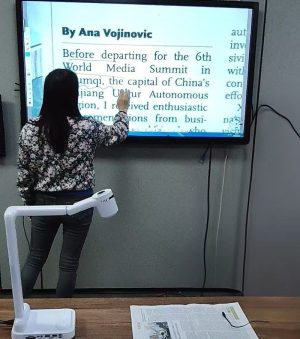
With a document camera, teachers can place textbooks, worksheets, newspapers, or real objects directly under the camera and display them instantly on a large screen. Teachers no longer need to write long explanations on the board. Students can view the same content at the same time. This is especially useful when introducing new vocabulary, analyzing printed texts, or discussing supplementary reading materials beyond the textbook.
A high-quality example is the FT-F705 document camera, which allows teachers to share materials clearly and efficiently, making lesson flow smoother.
Clear Details Improve Understanding
Modern document cameras provide high-resolution imaging, allowing small text and fine details to be displayed clearly. When connected to an all-in-one display or interactive screen, words, images, and diagrams appear sharp and readable even for students sitting at the back of the classroom. For example, when showing newspaper articles or external reading materials, teachers can zoom in on keywords, underline important sentences, or explain unfamiliar terms in real time. This reduces repeated explanations and helps students focus on key points faster.
Teachers and educators can also explore document camera classroom solutions for more ideas on using these devices effectively.
More Interaction, Less Repetition
A document camera encourages interaction. Teachers can annotate directly on the screen, compare multiple pages, or switch quickly between physical materials and digital content. Students benefit from clearer explanations, while teachers spend less time repeating instructions or rewriting content. The result is a smoother lesson flow and better use of classroom time.
Supporting Different Teaching Scenarios
Whether used for language classes, science demonstrations, or group discussions, a document camera adapts easily to different subjects. Many educators also check product information and use cases on established B2B platforms such as Made-in-China, which showcase practical applications in classrooms.
When working together with an all-in-one classroom display, a document camera becomes a practical tool that supports both traditional materials and modern teaching methods.
Conclusion
By making physical materials easier to share, clearer to see, and faster to explain, a document camera helps improve classroom efficiency. It allows teachers to focus more on teaching and interaction, while students gain a more engaging and effective learning experience.
 English
  简体中文
简体中文